
Showing posts with label IE9. Show all posts

Wednesday, December 19, 2018

Out-of-Band Security Update for Internet Explorer


Microsoft released an out-of-band security update for Internet Explorer 11 on Windows 10, Internet Explorer 11 on Windows 8.1 Update, Internet Explorer 11 on Windows 7 SP1, Internet Explorer 10 on Windows Server 2012, Internet Explorer 9, Windows Embedded Standard 2009 and Windows Embedded POSReady 2009.

The update addresses  remote code execution vulnerability CVE-2018-8653 that exists in the way that the scripting engine handles objects in memory in Internet Explorer.

It is strongly advised that this update be installed as soon as possible. (Note: For Windows RT and Windows RT 8.1, this update is available through Microsoft Update only.)

 
More:  For more information about the updates released today, see https://portal.msrc.microsoft.com/en-us/security-guidance/summary.  Updates can be sorted by OS from the search box. Information about the update for Windows 10 is available at Windows 10 Update history.


References


Remember - "A day without laughter is a day wasted."
May the wind sing to you and the sun rise in your heart...


Monday, November 10, 2014

Updates to Internet Explorer ActiveX Blocking

Internet Explorer 11


Blocking of out-of-date ActiveX controls was added to Internet Explorer versions 9 through 11 in October.  
With the update being released in November (11NOV2014), Microsoft is adding additional changes to out-of-date AxtiveX control blocking. 

To be included will be updates to currently supported operating system and browser combinations.  This is a welcome addition for users of Windows Vista.  Another addition to ActiveX blocking will include blocking out-of-date Silverlight.

Note:  After January 12, 2016, only the following configurations will be supported:


Windows operating system Internet Explorer version
Windows Vista SP2 Internet Explorer 9
Windows Server 2008 SP2 Internet Explorer 9
Windows 7 SP1 Internet Explorer 11
Windows Server 2008 R2 SP1 Internet Explorer 11
Windows 8.1 Internet Explorer 11
Windows Server 2012 Internet Explorer 10
Windows Server 2012 R2 Internet Explorer 11


References:

Home
Remember - "A day without laughter is a day wasted."
May the wind sing to you and the sun rise in your heart...


Thursday, May 01, 2014

Out of Band Security Update for IE Zero-Day Vulnerability


Microsoft released an out-of-band security update to address the security vulnerability in Internet Explorer described in Microsoft  Security Advisory 2963983.

Of important note:  Although Windows XP is no longer supported by Microsoft, the decision was made to issue a security update for Windows XP users.

Critical:

  • MS14-021 -- Security Update for Internet Explorer (2965111) 

    This security update resolves a publicly disclosed vulnerability in Internet Explorer. The vulnerability could allow remote code execution if a user views a specially crafted webpage using an affected version of Internet Explorer. An attacker who successfully exploited this vulnerability could gain the same user rights as the current user. Users whose accounts are configured to have fewer user rights on the system could be less impacted than users who operate with administrative user rights.


    References


    Remember - "A day without laughter is a day wasted."
    May the wind sing to you and the sun rise in your heart...


    Sunday, April 27, 2014

    Security Advisory 2963983, IE Zero-Day Vulnerability

    Security Advisory
    Microsoft released Security Advisory 2963983 which relates to a vulnerability in Internet Explorer.

    With the vulnerability, an attacker could cause remote code execution if someone visited a malicious website with an affected browser. Generally, this would occur by an attacker convincing someone to click a link in an email or instant message.

    Although the vulnerability affects all versions of IE, at this time, Microsoft is aware of limited, targeted attacks, in which the exploit observed appears to target IE9, IE10 and IE11.


    Additional details about the exploit are available from the FireEye Blog, New Zero-Day Exploit targeting Internet Explorer Versions 9 through 11 Identified in Targeted Attacks.

    Recommendations 

    As illustrated in the "Security Research and Defense Blog" reference below, users of IE 10 and 11 should ensure they haven't disabled Enhanced Protection Mode. 

    Another option is to install the Enhanced Mitigation Experience Toolkit (EMET).  The recommended setting for EMET 4.1, available from KB Article 2458544, is automatically configured to help protect Internet Explorer. No additional steps are required.

    See the Tech Net Advisory for instructions on changing the following settings to help protect against exploitation of this vulnerability:
    • Change your settings for the Internet security zone to high to block ActiveX controls and Active Scripting
    • Change your settings to prompt before running Active Scripting or to disable Active Scripting in the Internet and Local intranet security zone. 

    References:


    Remember - "A day without laughter is a day wasted."
    May the wind sing to you and the sun rise in your heart...

    Wednesday, February 19, 2014

    Microsoft Security Advisory 2934088

    Security Advisory
    Microsoft released Security Advisory 2934088 which impacts Internet Explorer 9 and 10. Internet Explorer 6, 7, 8 and 11 are not affected.

    Although Internet Explorer 9 is vulnerable, at this time, Microsoft is only aware of limited, targeted attacks against Internet Explorer 10. This issue allows remote code execution if users browse to a malicious website with an affected browser. This would typically occur by an attacker convincing someone to click a link in an email or instant message.

    Recommendations

    Users of Internet Explorer 10 should update to IE11, available here.

    If you use Internet Explorer 9 or 10 and are unable to update to Internet Explorer 11, it the below-linked Fix it solution is strongly advised.
     
    Enable Fix itDisable Fix it


    Another option is to install the Enhanced Mitigation Experience Toolkit (EMET), described in the "workarounds" section of the Tech Net Advisory as well as the Security Research and Defense Blog article.

    References:


    Remember - "A day without laughter is a day wasted."
    May the wind sing to you and the sun rise in your heart...

    Tuesday, September 17, 2013

    Security Advisory 2887505 and Microsoft Fix it

    Security Advisory
    Microsoft released Security Advisory 2887505 which relates to an issue with Internet Explorer.

    It is important to note that there are a limited number of targeted attacks which are specifically directed at Internet Explorer 8 and 9. The issue, however, could potentially affect all supported versions of IE.

    As described by Dustin Childs in the below-referenced MSRC Blog post,
    "This issue could allow remote code execution if an affected system browses to a website containing malicious content directed towards the specific browser type. This would typically occur when an attacker compromises the security of trusted websites regularly frequented, or convinces someone to click on a link in an email or instant message."

    Mitigations

    Microsoft has made available a Fix it solution for users of Internet Explorer.  Additional mitigations include the following advice, also from the MSRC Blog post:

    • Set Internet and local intranet security zone settings to "High" to block ActiveX Controls and Active Scripting in these zones
      This will help prevent exploitation but may affect usability; therefore, trusted sites should be added to the Internet Explorer Trusted Sites zone to minimize disruption.
    • Configure Internet Explorer to prompt before running Active Scripting or to disable Active Scripting in the Internet and local intranet security zones
      This will help prevent exploitation but can affect usability, so trusted sites should be added to the Internet Explorer Trusted Sites zone to minimize disruption.
    Below are the links to both apply and uninstall the Fix it solution.  Note:  The Fix it solution applies only 32-bit versions of Internet Explorer.
     
    Apply Fix itUninstall Fix it


    Another option is to install the Enhanced Mitigation Experience Toolkit (EMET), described in the "workarounds" section of the Tech Net Advisory.

    If you have Windows Vista or Windows 7 installed, you should have updated to IE9 or IE10.  In the event you haven't, it is strongly advised that you update!

    References:


    Remember - "A day without laughter is a day wasted."
    May the wind sing to you and the sun rise in your heart...

    Sunday, June 16, 2013

    Microsoft Fix it to Disable Java in Internet Explorer

    java

    Java, how we love to hate you!  Many people have uninstalled Java and do not miss it.  That is most likely because they do not have desktop applications that require Java. Unfortunately, that is not the situation for those people who use Java-dependent software programs. 

    Until recently, Internet Explorer was the only major browser that did not provide a way to disable Java.  The only way to completely disable Java in IE was to disable Java through the Java Control Panel, which meant re-enabling Java when using Java-dependent programs.  That is no longer true!

    Microsoft released a Microsoft Fix it solution designed to block all Java web-attack vectors through Internet Explorer.  As explained by Cristian Craioveanu in the below-linked Security Research & Defense Blog article, the Fix it solution is made up of two parts. 
    1. The Fix It uses the Windows Application Compatibility Toolkit to change the behavior of Internet Explorer at runtime to prevent Oracle’s Java Web plugins from loading.  As a result, the Java ActiveX dlls are not loaded.
    2. The second part of the Fix it clears the access control list (ACL) in the registry for the Java Network Loading Protocol (JNLP) handler which prevents Internet Explorer from automatically opening  files.  

    Instructions

    Before installing the Fix it solution, please follow the following suggestions:

    1.  Create a restore point

    2.  Back up the Registry
    3.  Apply the Fix it

    Disable the Java web-plugin

    Apply Fix it
    Restore the Java web-plugin
     
    Uninstall Fix it

    4.  Restart Internet Explorer
    For the changes to take effect, restart IE.

    To undo the changes, run Microsoft Fix it 50995 and restart IE.

    The Fix it solution has been tested by Microsoft and will work for all versions of Java from versions 5 and above.  It also works on all supported versions of Internet Explorer, whether 32- or 64-bit.


    References


    Home
    Remember - "A day without laughter is a day wasted."
    May the wind sing to you and the sun rise in your heart...


    Monday, January 14, 2013

    MS13-008 Released for Security Advisory 2794220


    Microsoft released an out-of-band security update to address the issue described in  Security Advisory 2794220.

    The update is to address an issue that affects Internet Explorer versions 6, 7 and 8.  Internet Explorer versions 9 and 10 are not affected.  

    This update is critical if you have Internet Explorer versions 6, 7 or 8 installed on your computer.  Windows XP users of IE6 or IE7 should update to IE8 as soon as possible.  Windows Vista and Windows 7 users should be using IE9.

    Note:  The Advance Notice for this update to Internet Explorer versions 6-8 indicated if the Microsoft Fix it was applied, it was not necessary to uninstall it prior to updating IE. 

    The advice provided now is to disable the Fix it after updating as it is no longer required.

    Fix it


    Disable

    Fix this problem
          Microsoft Fix it 50972

    References:


    Home
    Remember - "A day without laughter is a day wasted."
    May the wind sing to you and the sun rise in your heart...


    Sunday, January 13, 2013

    Advance Notification for Update to Address Security Advisory 2794220

    Security Bulletin
    On Monday, January 14, 2013, Microsoft is planning to release an out-of-band critical security update for the issue described in  Security Advisory 2794220.

    The update is to address an issue that affects Internet Explorer versions 6, 7 and 8.  Internet Explorer versions 9 and 10 are not affected. 

    Although Microsoft has seen only a limited number of customers affected by the issue, the potential exists that more could be affected.  Thus, it is advised that the update be installed as soon as possible. 

    Even with the update, if your operating system is Windows Vista or Windows 7, update to Internet Explorer 9.  For Windows XP, your system will be more secure if you update to Internet Explorer 8.

    If you applied the Fix it released in Security Advisory 2794220, it will not need to be uninstalled before applying the security update.

    References


    Home
    Remember - "A day without laughter is a day wasted."
    May the wind sing to you and the sun rise in your heart...


    Saturday, December 29, 2012

    Microsoft Security Advisory 2794220

    Security Advisory
    Microsoft released Security Advisory 2794220 to address an issue that affects Internet Explorer versions 6, 7 and 8.  Internet Explorer versions 9 and 10 are not affected.

    At this time, Microsoft is aware of a very small number of targeted attacks.  This issue allows remote code execution if users browse to a malicious website with an affected browser.  Generally, this is a result of an attacker convincing someone to click a link in an email or instant message.

    Recommendations:

    Microsoft is actively working to develop a security update to address the issue.  In the meantime, please consider the following suggestions:

    1.  Update Internet Explorer -- If your operating system is Windows Vista or Windows 7, update to Internet Explorer 9.  For Windows XP, your system will be more secure if you update to Internet Explorer 8.

    2.  Update or Uninstall Java -- Current exploits of this type of vulnerability in Internet Explorer use third-party software, including Oracle’s Java, to help obtain reliable exploitation.

    Most home computer users no longer need Java.  Following are reasons why someone may need Oracle Sun Java installed on their computer:

    • Playing on-line games generally requires Java.
    • With OpenOffice, Java is needed for the items listed here. 
    • It used to be that Java was needed for websites to be properly displayed. However, that is generally not the case now with Flash having taken over.
    • There may be commercial programs that depend on Java. If Java is needed for a software installed on your computer, there should be a prompt for it.
    If you need Java, be sure you have uninstalled all old, vulnerable versions and have only the most recent release installed on your computer.  The current version of Java is Version 7 Update 10.
     

    3.  Install and configure EMET -- The Enhanced Mitigation Experience Toolkit was designed to help prevent hackers from gaining access to your system. It prevents exploitation by applying in-box mitigations to help protect against this and other issues and should not affect usability of websites.

    An easy guide for EMET installation and configuration is available in KB2458544.  Additional information about configuring EMET is available in the EMET User's Guide, in the following locations:
    • 32-bit systems -- C:\Program Files\EMET\EMET User's Guide.pdf
    • 64-bit systems -- C:\Program Files (x86)\EMET\EMET User's Guide.pdf
    Additional suggestions are available in the MSRC Blog post and the Security Advisory, referenced below.

    References:


    Remember - "A day without laughter is a day wasted."
    May the wind sing to you and the sun rise in your heart...

    Friday, September 21, 2012

    Microsoft MS12-063 – Critical Cumulative Security Update for Internet Explorer


    Microsoft released MS12-063, a cumulative update for Internet Explorer addressing Security Advisory 2757760 as well as four other critical-class remote code execution issues.  The update requires a restart.
      The Bulletin addresses the following issues from the Common Vulnerabilities and Exposures (CVE) list:
      Internet Explorer 10 on Windows 8 and Windows Server 2012 is not affected.  All other versions of Internet Explorer are affected

      Support

      The following additional information is provided in the Security Bulletin:

      References


      Remember - "A day without laughter is a day wasted."
      May the wind sing to you and the sun rise in your heart...


      Wednesday, September 19, 2012

      Out of Band Internet Explorer Security Update

      Security Bulletin
      On Friday, September 21, 2012, Microsoft  will release MS12-063, a cumulative update for Internet Explorer addressing Security Advisory 2757760 as well as four other critical-class remote code execution issues.  The update will require a restart.

      Microsoft Fix it

      In addition, a Microsoft Fix it solution is available now for applying ahead of the update to protect your computer.

      Fix it
      EnableDisable
      Fix this problem
      Microsoft Fix it 50939
      Fix this problem
            Microsoft Fix it 50938

      (HT:  ky331)

      References


      Home
      Remember - "A day without laughter is a day wasted."
      May the wind sing to you and the sun rise in your heart...


      Sunday, October 09, 2011

      How Windows PCs Get Infected with Malware

      CSIS Security Group in Denmark conducted a study of almost three months where they collected real-time data from various so-called exploit kits that Danish users were exposed to.  As described by Peter Kruse, Partner and Security Specialist at CSIS:
      "An exploit kit is a commercial hacker toolbox that is actively exploited by computer criminals who take advantage of vulnerabilities in popular software. Up to 85 % of all virus infections occur as a result of drive-by attacks automated via commercial exploit kits."

      How PCs Get Infected

      The CSIS study revealed that as much as 99.8 % of all virus/malware infections were a direct result of not updating five specific software packages.  Aside from missing Microsoft security updates, the study revealed the following out of date programs as being the most used by malware:  Java JRE (37%), Adobe Reader and Adobe Acrobat (32%), Adobe Flash (16%) and Microsoft Internet Explorer (10%).

      Third-Party Software

      Setting aside browser and operating system for the moment, what is notable from the CSIS study is the impact of third-party software, notably Java JRE, Adobe Reader and Adobe Acrobat and Adobe Flash.

      Oracle Java JRE
      When it comes to Oracle Java JRE, you may have it installed on your computer but might not even need it.  Following are reasons why someone may need Oracle Sun Java installed on their computer:
      • Playing on-line games generally requires Java.
      • With OpenOffice, Java is needed for the items listed  here . 
      • It used to be that Java was needed for websites to be properly displayed. However, that is generally not the case now with Flash having taken over.
      • There may be commercial programs that depend on Java. If Java is needed for a software installed on your computer, there should be a prompt for it.
      If the above does not apply to you, consider uninstalling Java.  In the event you discover that it is needed, you can always download the most recent version.

      Adobe Products
      Regular readers of this blog are familiar with my postings of critical updates for Adobe products.  You may not realize, however, that there have been over a dozen critical updates of Adobe products just this year between February and September.  Combined, out-dated Adobe products were the direct result of 48% of the infections in the analysis.

      Although I will continue providing updates for these products, it is advisable that you check that you have the most recent versions of Adobe products.  Personally, I switched to an alternate PDF reader some time ago.  There are a number of open source readers available from http://pdfreaders.org/.  Others include Nitro Reader and Sumatra PDF.

      Internet Explorer

      Although Internet Explorer is listed as shown in the CSIS analysis as the most affected browser, the report falls short in not breaking down the statistics by browser version.  According to the IE6 Countdown, at the end of September, 2011, 9% of the world is still using IE6.

      It is not very likely that 66% of  reported thousands of users in the analysis who had been exposed to drive-by attacks were using IE9.  Nonetheless, Denmark should be commended with only 0.7% of the users still on IE6.  The percentage still using IE7 is unknown.  Considering the high percentage of affected Windows XP computers, it would not be surprising to learn that the majority have not updated to IE8.

      References

      CSIS: This is how Windows get infected with malware
      IE6 Countdown
      Microsoft Download Center - Windows Internet Explorer 8 for Windows XP


      Remember - "A day without laughter is a day wasted."
      May the wind sing to you and the sun rise in your heart...


      Thursday, August 11, 2011

      Microsoft Update Impacts WinPatrol Cookie Monitoring

      WinPatrol fans who monitor cookies in Internet Explorer will discover after installing the latest Microsoft security updates that cookies do not display as expected in WinPatrol.

      Instead of seeing the expected site or cookie name displayed, cookies are identified as alpha-numeric.txt files (i.e., HILD912G.txt).

      In testing, I intentionally started installing the security updates one-by-one, selecting Microsoft Security Bulletin MS11-057 - Critical: Cumulative Security Update for Internet Explorer (2559049) first since it applies to all three operating systems and browsers. Indeed, following a restart, I was able to confirm the change in cookie display for IE9 on Windows 7. 

      Based on feedback from WinPatrol users, this issue has been confirmed in Windows XP, Windows Vista and Windows 7 with IE8 and IE9.  (IE6 and IE7 have not been tested but will likely be impacted the same since the update applies to all versions of Internet Explorer.)

      MS11-057 is a critical security update and it is strongly advised that it be installed. Cookies are a minor issue compared to the fix in this update, which, as described in the MSRC Blog:

      "resolves five privately reported vulnerabilities and two publicly disclosed vulnerabilities in Internet Explorer. The most severe of these vulnerabilities could allow remote code execution if a user views a specially crafted webpage using Internet Explorer."
      Bill Pytlovany has been advised of the situation and is actively working on a solution.  


      Remember - "A day without laughter is a day wasted."
      May the wind sing to you and the sun rise in your heart...


      Tuesday, May 31, 2011

      Fix for Adobe Flash Player Rendering Issues with IE9


      Adobe has released Flash Player 10.3.181.16 for Internet Explorer only.  The update for Internet Explorer addresses an issue where Flash animations were displaying in the left-hand corner of the screen for users of Internet Explorer 9.

      The version for other browsers remains at 10.3.181.14.

      Note: If you disabled hardware acceleration in Internet Explorer 9 using the instructions on this page, you should re-enable hardware acceleration.

      In the event you reverted to a previous version of Flash Player, it is strongly advised that this update be applied as soon as possible as the updated version included critical security updates.

      Download

      Direct Download for IE users: http://fpdownload.macromedia.com/get/flashplayer/current/install_flash_player_ax.exe

      Verify Installation

      To verify the Adobe Flash Player version number installed on your computer, go to the About Flash Player page, or right-click on content running in Flash Player and select "About Adobe Flash Player" from the menu.


      Remember - "A day without laughter is a day wasted."
      May the wind sing to you and the sun rise in your heart...


      Friday, May 20, 2011

      Adobe Flash Player 10.3 and IE 9 Issues


      The critical security update to Adobe Flash Player 10.3 has resulted in SWF content being displayed in the upper left corner of the screen in some cases. 

      The issues appear to be limited to Adobe Flash Player 10.3 and Internet Explorer 9.  As a result, Adobe has temporarily disabled the automatic update notification for Flash Player 10.3 and Internet Explorer. 

      A hotfix is in the works and a new version is expected to be available next week.  In the meantime, Adobe has provided the following workarounds:


      "1. On some systems, you might be able to resolve this issue by updating the Intel HD Graphics drivers.  It has been reported that version 8.15.10.2361 and above do not display this bug.  Unfortunately, some systems might require updates directly from your system manufacturer.  We're working with system manufacturers to make sure they include the latest drivers in future releases.

      2. You can disable hardware acceleration in Internet Explorer 9 using the instructions on this page.  Please note that you should re-enable hardware acceleration once this problem has been resolved to enjoy the full benefits of hardware acceleration.

      3. Use an alternate browser. All reports indicate that this issue is specific to Internet Explorer 9.  You can use Firefox, Chrome, Safari, Opera, etc. with content designed for Flash Player while this issue is being resolved.

      4. You can manually uninstall Flash Player 10.3 and revert back to Flash Player 10.2.  While we always recommend you use the latest Flash Player for security and stability, this will get you back to your previous version."


      Remember - "A day without laughter is a day wasted."
      May the wind sing to you and the sun rise in your heart...


      Friday, March 04, 2011

      Internet Explorer 6 Countdown

      Are you included among the 12 percent of people from around the world who are still using Internet Explorer 6?  Although browser statistics of visitors to Security Garden indicate only 2.6 percent use IE 6, it is long past time for those visitors to update.

      I understand that not everyone has the latest and greatest computer.  These are hard times and we all need to watch our budget.  However, there have been numerous advances in IE since version 6 was introduced ten years ago.  Forget the pretty-pretty new features.  Most significant, from my point of view, are the enhanced security features in the newer versions of Internet Explorer.

      Granted, IE9 is not compatible with Windows XP.  However, you can still upgrade to IE8. IE8 has significant built-in security features, including SmartScreen, Cross Site Scripting (XSS) Filter, Click-jacking prevention, Data Execution Prevention, InPrivate Browsing, and InPrivate Filtering.  (See Internet Explorer 8: Features/ for information about these security and safety features.)  For those who would rather upgrade in stages, if need be, you can start with IE7 (download link below) and then follow up with IE8.

      Although most of the Security Garden visitors are from the United States, United Kingdom and Canada, people from all around the world find their way here.  If you are represented by the list of actual Security Garden visitors in the list of countries below, and are also included among the 2.66 percent of my visitors who use IE6, please update today!

      Security Garden visitors from around the world:

      Australia
      Barbados
      Belgium
      Brazil
      Brunei Darussalam
      Bulgaria
      Canada
      Chile
      Croatia
      Czech Republic
      Denmark
      Dominican Republic
      Finland
      France
      Germany
      Greece
      Hong Kong
      Hungary
      India
      Indonesia
      Iraq
      Ireland
      Italy
      Japan
      Korea, Republic Of
      Libyan Arab Jamahiriya
      Lithuania 
      Macedonia
      Malaysia
      Mexico
      Netherlands
      New Zealand
      Norway
      Pakistan
      Peru 
      Philippines
      Poland
      Puerto Rico
      Romania
      Russian Federation
      Serbia
      Singapore
      South Africa
      Spain
      Sri Lanka
      Sweden
      Switzerland
      Taiwan
      United Kingdom
      United States
      Venezuela
      Vietnam


      Don't be one of these statistics:


      References:

      Clubhouse Tags: Clubhouse, Microsoft, Internet Explorer, IE6, IE7, IE8, IE9, Windows XP, Windows Vista, Windows 7, Information, Windows


      Remember - "A day without laughter is a day wasted."
      May the wind sing to you and the sun rise in your heart...

      Monday, February 21, 2011

      Internet Explorer 9, Privacy and Security Enhancements

      Within days of IE9 RC (Release Candidate) being made available for download, over two million user-initiated downloads occurred. If you installed the IE9 Beta, you may have already been offered the RC via Windows Update.  If it has not been offered to you yet, you may want to check for updates or you can download it yourself from Beauty of the Web.  It is not necessary to uninstall the Beta.  As you may recall, IE9 is not compatible with Windows XP. 

      You can learn about the Beauty of the Web from many sources. I prefer to direct your attention to the security and privacy enhancements in IE9 RC.  You can locate most of the security and privacy features via the Tools menu, represented by the gear icon.

      Safety Menu
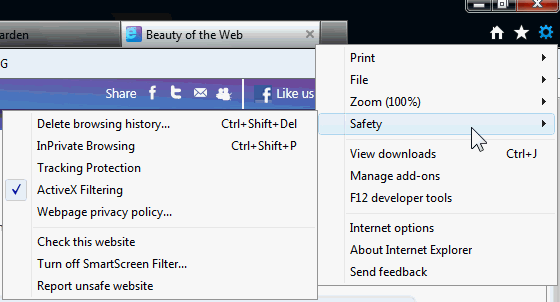

      Tracking Protection Lists (TPLs) 
      Accessible via Tools > Safety

      Tracking Protection in IE9 provides control of what data is shared as you navigate from one website to another.  This is accomplished by adding Tracking Protection Lists (TPLs) to Internet Explorer. Anyone, and any organization, on the Web can create and publish Tracking Protection Lists.

      The default installation of IE9 does not include TPLs.  Rather, Microsoft has left the option available to add lists created by others.  By installing a TPL, third party content, images, ads, and analytics are blocked for the sites included in the list.  Tracking Protection is not on by default. Thus, after turning on Tracking Protection, it will remain on until you turn it off.

      Although having TPLs enabled will block third-party content, this feature also includes the ability to include “OK to Call” addresses.  This is to ensure you can access these sites even if one of their lists has the site identified as “Do Not Call.”


      Before you start adding Tracking Protection Lists, make certain that you understand how they work. I consider Ed Bott's article, Privacy protection and IE9: who can you trust? a "must read" if you are going to use TPLs. If you get nothing else from the article, at least note:
      "So who can you trust? That question is especially important when you take into account the design of this feature in the IE9 RC. You can install multiple TPLs, and an Allow rule on any list trumps a Block rule on another list. So if you’re the owner of a big network of web properties, and you see a site visitor arrive using IE9, wouldn’t you want to helpfully offer that visitor the option to install a Tracking Protection List that whitelists all your domains? All in the interests of improved user experience, of course." {Emphasis added}
      Then see the following quote from further in the article:
      "As you can see from the table, TRUSTe’s current TPL represents advertisers, not consumers. TRUSTe’s TPL, unlike any of the others, consists exclusively of Allow rules for entire domains. Remember: Allow rules trump Block rules. So, if your domain is one of the nearly 4000 on the current version of the TRUSTe list, you’ve got a Get Out of Jail free card in IE9 with any user who installs the TRUSTe list."
      As Ed pointed out, "Remember:  Allow rules trump Block rules."  Be selective about the TPLs you install or you will be counter-acting the tracking you are attempting to block. 

      The currently available TPLs are available from Internet Explorer 9 Tracking Protection Lists.  From that site, click "Add TPL" for the desired list(s):


      Active X Filtering 
      Accessible via Tools > Safety

      ActiveX controls are small programs, or add-ons, that are used to provide multimedia effects, animation, collecting data, and other interactive features on web sites. Some websites require you to install ActiveX controls to see the site or perform certain tasks on it.
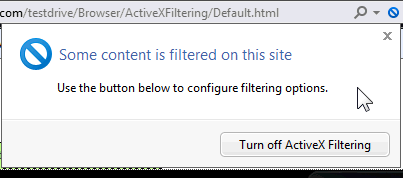
      With Active X filtering turned on, you can choose which websites are allowed to run ActiveX controls. If you visit a site that has not been approved, the browser will not prompts to install or enable them.  Instead, when you reach a site with Active X being filtered, as identified by the circle with a line through it, click the indicator and select the option to Turn off Active X filtering.

      Conversely, if you end up at a site with a lot of flash, rotating images, use Active X filtering to reverse the process:


      SmartScreen Filter 
      Accessible via Tools > Safety

      The features of the SmartScreen® continue to include Anti-Phishing, Application Reputation and Malvertising Protection.  With additional information being collected, the features of Application Reputation have been improved. 

      Application Reputation:

      With Application Reputation, the SmartScreen Filter in IE9 is collecting additional information than it did in IE8.  The most significant change is that it will send information about the downloaded program, including a file identifier (a “hash”), results from installed antivirus tools, and the program’s digital certificate information.

      The check of the file identifier by SmartScreen download reputation will result in IE9 removing warnings for commonly downloaded programs.  As illustrated below, warnings will be provided in the download manager for programs that are higher risk. Conversely, there will not be a warning for a well known program.


      (Click image to see full-size)

      Anti-Phishing and Malvertising Protection:

      Most people are familiar with the term "phishing", generally in the form of an e-mail that appears to be from a legitimate site (bank, credit card company, or online merchant). Instead of being linked to the legitimate website, the links in the e‑mail message are directed to a fraudulent website where personal information, such as an account number or password is requested. This information is then typically used for identity theft.
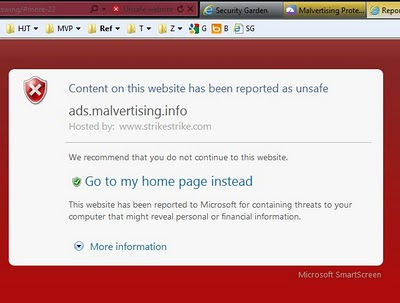
      The term malvertising was derived from "malicious advertising".  The advertisement could be in the form of a Flash-based ad banner or malicious content in frames that presents fake alerts (such as fake/rogue anti-virus warnings that your computer is infected).  Although the actual site being visited is safe, the malicious advertisement that is rotated in by an ad service is not.

      With SmartScreen activated in IE9, in the event you click a link in an e-mail that goes to a known phishing site or attempt to go to a website where a malicious advertisement has been reported as unsafe, IE9 will block the ad and provide a warning that the website is hosting malicious content.  Although not fully appreciated in the partial screen copy from the demo sample provided by Microsoft, the complete background of page is a bright red.
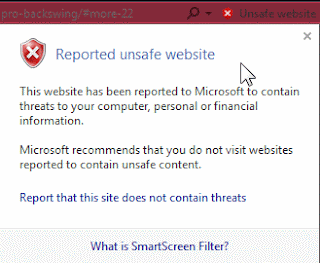

      Along with the warning, the address bar includes the security warning symbol next to the wording "Unsafe website".  Clicking the symbol provides the following additional information:


      Suggested Sites 
      Accessible via Tools > File

      If you use Suggested Sites, be aware that Internet Explorer 9 is collecting some additional data on images and videos that are included on the sites visited (including the URLs of the images or videos).  The purpose of the additional information is to help determine which images and videos are popular and improve the Suggested Sites recommendations.

      Additional details are available in the Internet Explorer 9 privacy statement.


      User input by the many Beta testers had an influence on the Release Candidate.  The changes that were made to the IE9 Release Candidate based on Beta feedback are discussed at the IEBlog in User Experiences – Listen, Learn, Refine.


      If you are anxious to upgrade to the IE9 Release Candidate, be sure you have the required updates installed.


      Required Updates for Windows Vista
      • KB971512: Windows Graphics, Imaging, and XPS Library Updates
      • KB2117917: Beta Platform Update Supplement

        Required Updates for Windows 7
      • KB2028551: Resolves Issues Printing XPS Containing Visual Brushes
      • KB2028560: Performance Improvements for the Graphics Platform
      • KB2120976: Addresses Streaming Issues with Media Foundation


      Microsoft References:


      Recommended Articles by Ed Bott:


      Clubhouse Tags: Clubhouse, Microsoft, Internet Explorer, IE9, Windows Vista, Windows 7, Information, Windows

      Remember - "A day without laughter is a day wasted."
      May the wind sing to you and the sun rise in your heart...