Tuesday, November 28, 2023

Pale Moon Version 32.5.1 Released with Security Updates

Pale Moon

Pale Moon has been updated to version 32.5.1.  This is a minor development and security update.

Important: as of this version, our beta FreeBSD binaries require at least FreeBSD 13.


Changes/fixes:

  • Restricted protocol fallback for TLS. Pale Moon no longer (by default) allows TLS 1.3 to fall back to earlier protocol versions during the initial handshake.
  • Reverted the addition of browser.bookmarks.openInTabClosesMenu due to behavioral issues with menus.
    If you desire the intended behavior, please use an extension instead.
  • We no longer support the data: protocol inside SVG's <use> statements.
  • Enabled more validation/error checking for WebGL on Windows to prevent potential crashes.
  • Improved secure context checking for iframes.
  • Fixed the handling of relative paths in URLs starting with multiple forward slashes.
  • Security issues addressed: CVE-2023-6204, CVE-2023-6210, CVE-2023-6209 and CVE-2023-6205 DiD
  • UXP Mozilla security patch summary: 3 fixed, 1 DiD, 14 not applicable.

Notes:

*DiD This means that a fix is "Defense-in-Depth": It is a fix that does not apply to a (potentially) actively exploitable vulnerability in Pale Moon, but prevents future vulnerabilities caused by the same code, e.g. when surrounding code changes, exposing the problem, or when new attack vectors are discovered.

Rejected security patches: This means that patches were theoretically applicable to our code but considered undesirable, which could be due to unwanted changes in behavior, known regressions caused by the patches, or unnecessary risks for stability, security or privacy.

Pale Moon includes both 32- and 64-bit versions for Windows: Pale Moon for Windows downloads.

Update: To get the update now, select "Help" from the Pale Moon menu at the upper left of the browser window.  Select About Pale Moon > Check for Updates.

Release Notes
Release Cycle

Home
Remember - "A day without laughter is a day wasted."
May the wind sing to you and the sun rise in your heart...

Tuesday, November 21, 2023

Mozilla Firefox Version 120.0 Released with Security Updates

  FirefoxMozilla sent Firefox Version 120.0 to the release channel.  The update includes eleven security updates of which seven (7) are rated high, two (2) moderate, and two (2) rated low.

Firefox ESR was updated to Version 115.5.

High

#CVE-2023-6204: Out-of-bound memory access in WebGL2 blitFramebuffer
#CVE-2023-6205: Use-after-free in MessagePort::Entangled
#CVE-2023-6206: Clickjacking permission prompts using the fullscreen transition
#CVE-2023-6207: Use-after-free in ReadableByteStreamQueueEntry::Buffer
#CVE-2023-6212: Memory safety bugs fixed in Firefox 120, Firefox ESR 115.5, and Thunderbird 115.5
#CVE-2023-6213: Memory safety bugs fixed in Firefox 120


#

Moderate

#CVE-2023-6208: Using Selection API would copy contents into X11 primary selection
#CVE-2023-6209: Incorrect parsing of relative URLs starting with "///"

Low

#CVE-2023-6210: Mixed-content resources not blocked in a javascript: pop-up
#CVE-2023-6211: Clickjacking to load insecure pages in HTTPS-only mode


New

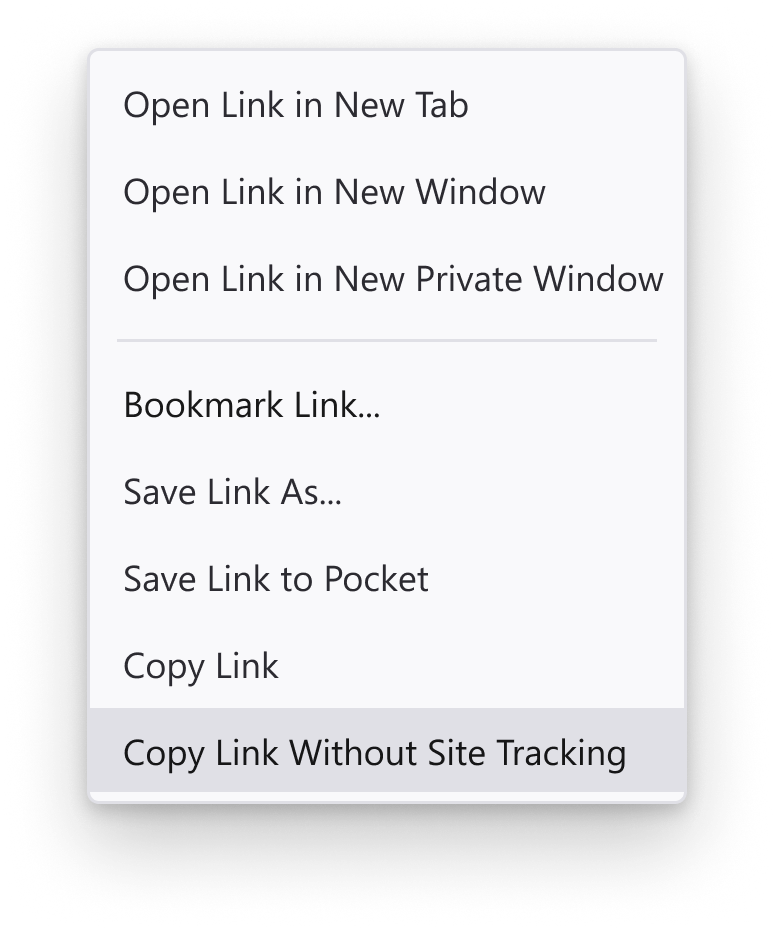
  • Firefox supports a new “Copy Link Without Site Tracking” feature in the context menu which ensures that copied links no longer contain tracking information.

    Screenshot showing Copy Link feature

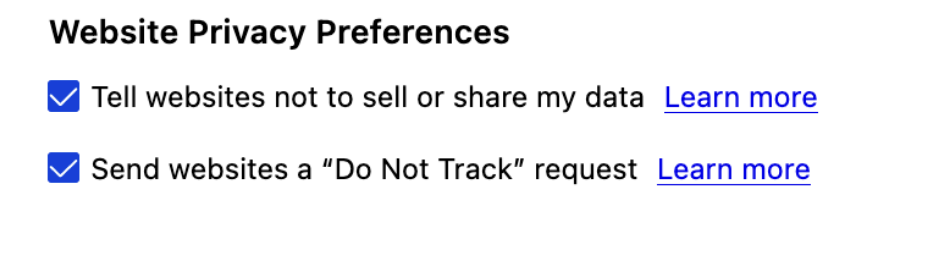
  • Firefox now supports a setting (in Preferences → Privacy & Security) to enable Global Privacy Control. With this opt-in feature, Firefox informs the websites that the user doesn’t want their data to be shared or sold.

    Screenshot showing GPC preference

  • Firefox’s private windows and ETP-Strict privacy configuration now enhance the Canvas APIs with Fingerprinting Protection, thereby continuing to protect our users’ online privacy.

  • Firefox has enabled Cookie Banner Blocker by default in private windows for all users in Germany. Firefox will now auto-refuse cookies and dismiss annoying cookie banners for supported sites.

  • Firefox has enabled URL Tracking Protection by default in private windows for all users in Germany. Firefox will remove non-essential URL query parameters that are often used to track users across the web.

  • Firefox now imports TLS trust anchors (e.g., certificates) from the operating system root store. This will be enabled by default on Windows, macOS, and Android, and if needed, can be turned off in settings (Preferences → Privacy & Security → Certificates).

  • Keyboard shortcuts have now been added for editing and deleting a selected credential on about:logins. For editing - Alt + enter (Option + return on macOS) and for deleting - Alt + Backspace (Option + Delete on macOS).

  • Users on Ubuntu Linux now have the ability to import from Chromium when both are installed as Snap packages.

  • Picture-in-Picture now supports corner snapping on Windows and Linux - just hold Ctrl as you move the PiP window.


Update: To get the update now, select "Help" from the Firefox menu, then pick "About Firefox."  Mac users need to select "About Firefox" from the Firefox menu. If you do not use the English language version, Fully Localized Versions are available for download.

References


Remember - "A day without laughter is a day wasted."
May the wind sing to you and the sun rise in your heart...
Tuesday, November 14, 2023

Microsoft November 2023 Security Updates


The Microsoft November 2023 security updates have been released and consist of 63 new patches. In addition, multiple Chromium bugs and other externally reported CVEs are being incorporated into the release, bringing the total number of CVEs to 78.


Of the CVEs released, 3 are rated critical, 56 are rated important and 4 are rated moderate in severity. At the time of release, three of the CVEs are listed as being under active attack and three as publicly known.

The security updates apply to the following products, features and roles: Microsoft Windows and Windows Components; Exchange Server; Office and Office Components; ASP.NET and .NET Framework; Azure; Mariner; Microsoft Edge (Chromium-based), Visual Studio, and Windows Hyper-V.

See the list of KBs at the bottom of the page at November 2023 Security Updates - Release Notes - Security Update Guide - Microsoft for information regarding known issues with the security updates as well as the CVEs with FAQs, Mitigations and/or Workarounds. For specific information on Windows 11, versions 23H2 and 22H2, see KB5032190.  For Windows 10, Version 22H2 and 21H2, see KB5032189.

Recommended Reading:   See Dustin Childs review and analysis in Zero Day Initiative -- The Novemberr 2023 Security Update Review.


Additional Update Notes:


References


Remember - "A day without laughter is a day wasted."
May the wind sing to you and the sun rise in your heart...